Pillow can be thought of as the middleman between BedSheet and efanXtra. This article shows how the Bed Nap application can use it to automatically route request URLs to its efanXtra components.
Re-Route Index Page
A Pillow page is any efanXtra component that has been annotated with the @Page facet.
Upon startup Pillow scans your BedSheet application for pages and automatically sets up BedSheet Routes based on their class name.
So let's convert IndexPage to a Pillow page, it's as simple as adding a Page facet. But first download afPillow and add it as dependency:
fanr install -r http://eggbox.fantomfactory.org/fanr "afPillow 1.1.2 - 1.1"
Then update IndexPage:
using afIoc::Inject
using afEfanXtra::EfanComponent
using afPillow::Page

@Page
const mixin IndexPage : EfanComponent {
    @Inject abstract VisitService visitService
}
This is enough for Pillow to automatically route all requests to the URL /index, render the IndexPage as an efanXtra component and return the HTML to the browser.
Why the URL /index? Because Pillow looks at the class name Index and is clever enough to knock off the surplus Page suffix. (Note page classes and templates do not have to end in Page.) This then gives /index.
Welcome Pages
Does Pillow really route the URL /index to IndexPage? It could do, but actually, this happens:
/index --> Redirects to /
/      --> Renders IndexPage
This is due to the default Welcome Page Strategy. Welcome pages, also known as home pages or directory pages, are pages that are served when a directory URL is requested; that is, any URL that ends with a /.
Index is the default Welcome Page Name meaning when a directory URL is requested, Pillow internally adds Index to the URL and renders that page. Hence the URL / renders the IndexPage page.
But people and browsers will often add index, or index.html to directory URLs due to convention. So Pillow helpfully redirects these URLs to the shorter directory URL notation. This strategy is called onWithRedirects and is the default Welcome Page Strategy, others are available.
Re-Route View Page
Let's convert ViewPage into a Pillow page. Again, just add the @Page facet:
using afEfanXtra::InitRender
using afEfanXtra::EfanComponent
using afPillow::Page

@Page
const mixin ViewPage : EfanComponent {
    abstract Visit visit

    @InitRender
    Void initRender(Visit visit) {
        this.visit = visit
    }
}
Note that the initRender() method is still there... that's because Pillow has a neat trick; it inspects the initRender() method (if there is one) and maps request URL segments to it!
Pillow looks at the above page and, because of the class name, maps it to /view. It then looks at the initRender() method, sees the one method parameter, and further maps it to /view/**.
Visit is said to be the context of the page, because it changes the context of what ViewPage renders. All we do with the visit is set it to a field so it can be used by the template.
Because this is such a widely used pattern (using the initRender() to set a page context field) Pillow has a shortcut for it, just annotate the field with @PageContext:
using afEfanXtra::InitRender
using afEfanXtra::EfanComponent
using afPillow::Page
using afPillow::PageContext

@Page
const mixin ViewPage : EfanComponent {
    @PageContext abstract Visit visit
}
Run It
Let's delete some now redundant code:
- Delete the
PageRoutes.fanclass. - In
AppModule:- Delete
contribueRoutes() - Delete
contributeEfanLibs()
- Delete
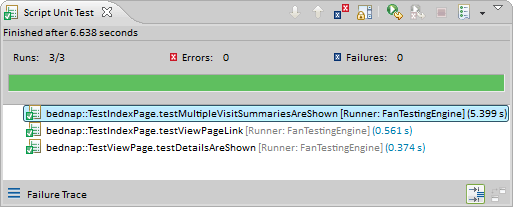
And all our tests should still pass!
So lets start up the web application and try it out for real:
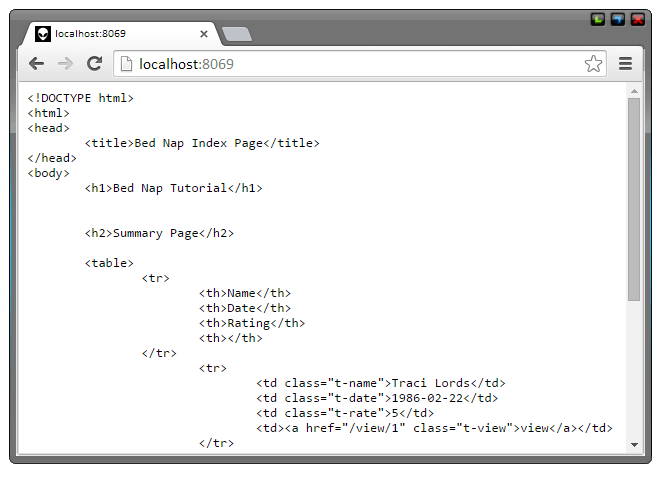
Err... what's that!?
Let's take closer look at the HTTP response headers:
HTTP/1.1 200 OK
Content-Type: text/plain
Cache-Control: max-age=0, no-cache
Connection: keep-alive
Content-Length: 312
X-afPillow-renderedPage: bednap::IndexPage
Server: Wisp/1.0.66
Content-Encoding: gzip
Date: Mon, 01 Sep 2014 19:08:54 GMT
Vary: Accept-Encoding
The cause of our web page being rendered as plain text is the line:
Content-Type: text/plain
That's because Pillow doesn't know what kind of markup our template is generating. D'Oh!
So how do we tell it that our pages render HTML and not plain text?
Content Type
To tell Pillow what content the template markup represents we could set it directly with @Page.contentType, or...
We could rename our template files to have a double suffix / extension:
IndexPage.html.efan
ViewPage.html.efan
By doing this Pillow converts the inner extension .html to a MimeType and uses this as the returned Content-Type.
Try it. Rename the template files, re-build the application and refresh the browser. You should see rendered HTML again.
Tidy Up
Time to make our web app work better.
Page URLs
In IndexPage.html.efan we link to ViewPage by hard coding the URL to /view/<%= it.id%> which works... but it's very brittle and prone to error.
What if the page URL changed to view/visit/xxx, or the ID encoding changed to base64, or what if the app is run under a non-root WebMod (causing all the app URLs to have an extra path prefix), or what if...?
Problems.
Wouldn't it be great if we could just auto-generate these page URLs?
The good news is we can! We can use Pillow's Pages service to get a PageMeta instance for any given page and context. The PageMeta.pageUrl() method then returns the URL we want.
IndexPage.fan:
using afIoc::Inject
using afEfanXtra::EfanComponent
using afPillow::Pages
using afPillow::Page

@Page
const mixin IndexPage : EfanComponent {
    @Inject abstract VisitService    visitService
    @Inject abstract Pages           pages

    Uri viewUrl(Visit visit) {
        pages.pageMeta(ViewPage#, [visit]).pageUrl
    }
}
IndexPage.html.efan:
...
    <td><a href="<%= viewUrl(it).encode %>" class="t-view">view</a></td>
...
The visit object is encoded via the VisitEncoder class that we wrote all the way back in IDs and ValueEncoders. That's good, for that means VisitEncoder is now used to both encode and decode our Visit objects to and from URL notation.
Let's do the same for ViewPage linking back to IndexPage.
IndexPage.fan:
using afIoc::Inject
using afEfanXtra::InitRender
using afEfanXtra::EfanComponent
using afPillow::Page
using afPillow::Pages
using afPillow::PageContext

@Page
const mixin ViewPage : EfanComponent {
    @PageContext    abstract Visit    visit
    @Inject         abstract Pages    pages
}
IndexPage.html.efan:
...
<div><a href="<%= pages[IndexPage#].pageUrl.encode %>">< Back</a></div>
...
No need to create an extra method for that one, we just call the service direct from the template.
The nice thing about the IndexPage URL is that Pillow knows it's a Welcome Page (and the strategy is enabled) so the URL is returned as the abbreviated / and not the longer /index - which would lead to a redirect.
Testing which Page was Rendered
Looking back to the list of HTTP response headers you may have noticed this:
X-afPillow-renderedPage: bednap::IndexPage
When BedSheet is not in production mode and Pillow returns a page that it has rendered, it sets a X-afPillow-renderedPage response header. Tests can make use of this to ensure that a request URL renders the intended page.
In a Bounce test there is nothing more annoying than wasting time chasing up an Element not found error only to find it's because the wrong page was rendered! This often happens when either an error page is rendered, or a form validation error re-renders the same page and not the success page.
To get the Type of the rendered page you could add this method to WebTest:
Type renderedPage() {
    Type.find(client.lastResponse.headers["X-afPillow-renderedPage"])
}
It's then easy enough to assert that renderedPage() is equal to the expected page.
Source Code
All the source code for this tutorial is available on the Bed Nap Tutorial Bitbucket Repository.
Code for this particular article is available on the 08-Page-Routing-With-Pillow branch.
Use the following commands to check the code out locally:
C:\> hg clone https://bitbucket.org/fantomfactory/bed-nap-tutorial
C:\> cd bed-nap-tutorial
C:\> hg update 08-Page-Routing-With-Pillow
Don't forget, you can trial the finished tutorial application at Bed Nap.
Have fun!
Edits
- 8 Aug 2016 - Updated tutorial to use BedSheet 1.5 & IoC 3.0.
- 8 Aug 2015 - Updated tutorial to use BedSheet 1.4.
- 4 Sep 2014 - Original article.